This is a free Sharp EL-501 online alternative for students who do not have the calculator with them. It covers the core scientific functions, shows the whole expression on screen, and adds a guide to the angle units, error messages and typing habits that cause most wrong answers on a compact Sharp.
Is There a Free Sharp EL-501 Online?
We found no official free web version of the EL-501 series from Sharp. This page is a free Sharp EL-501 online alternative for the core scientific functions. It does not copy the keypad layout or the display, and key labels differ between versions, so check your own manual for exact names.
What Is the Sharp EL-501 Series Good For?
It is a compact, budget scientific calculator line for introductory classes. You type expressions in the order you write them, and the calculator follows the standard order of operations. Sharp lists the EL-501X with 131 functions and a one-line, 10-digit (8 + 2) display, and retailer listings give the newer EL-501X2 as 146 functions. One line means you cannot see the whole expression you typed. This page shows the full line and keeps a history, which makes it a handy way to check what you meant to enter.
Sharp EL-501 Online Key Guide: Where Is Each Key?
| Key type on a Sharp EL-501 | What it does | On this page |
|---|---|---|
| 2ndF | Opens the second function printed above a key | Not needed |
| DRG | Cycles through degrees, radians and grads | Deg and Rad buttons (no grads) |
| EXP | Enters scientific notation | EXP key |
| x², x^y, square root | Powers and roots | Same keys |
| log and ln | Common and natural logarithm | Same keys |
| Hyperbolic functions | Sinh, cosh and tanh | Not on this page |
| Statistics mode | Mean and standard deviation | Extended Functions on the main calculator |
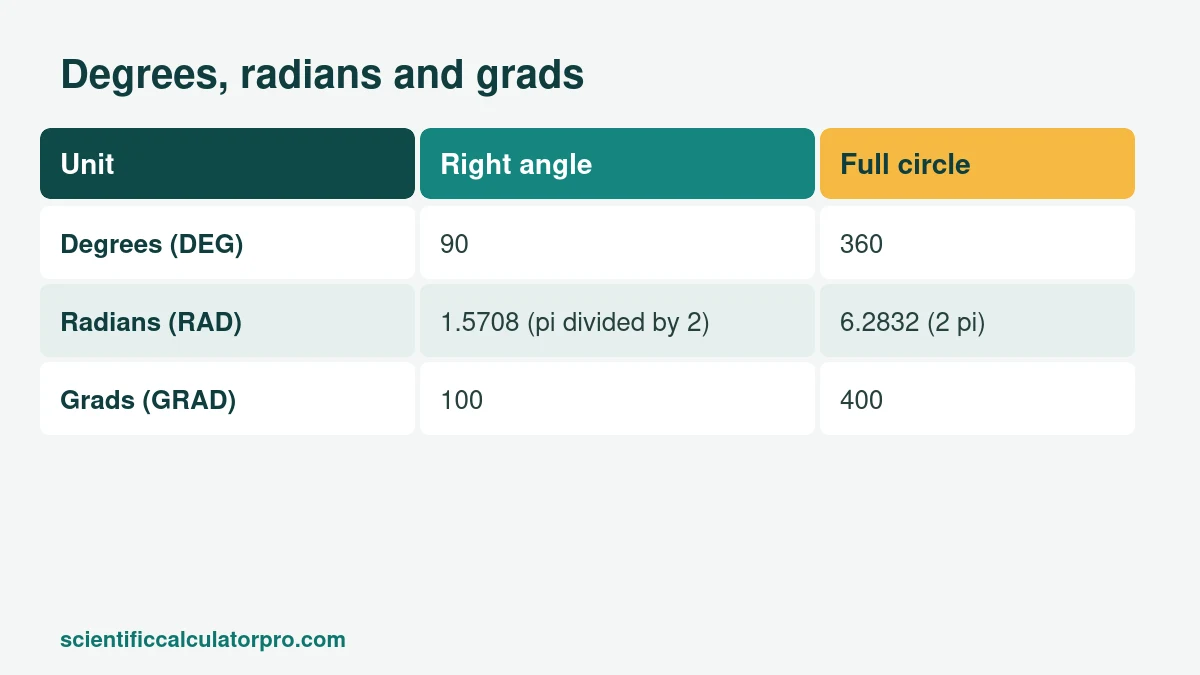
What Are Degrees, Radians and Grads?
They are three ways to measure an angle. A right angle is 90 degrees, about 1.5708 radians, or 100 grads. Most school maths uses degrees or radians, but Sharp and Casio calculators also offer grads, and a calculator left in grad mode quietly ruins every trig answer.
The same entry gives three different results. sin(100) is 0.9848 in degree mode, −0.5064 in radian mode and 1 in grad mode. This page has degree and radian modes. If your Sharp shows an unexpected trig answer, check the DRG setting first.
Why Does a Sharp Calculator Show an Error Message?
Sharp calculators show an error message when something goes wrong, and your manual lists what each message means. The usual causes are dividing by zero, a bracket that does not match, a result too large for the display, or the wrong mode. The EL-501X lists binary, octal, decimal and hex modes, and being left in another number base can make ordinary entries fail. Look for a small base symbol on the screen and switch back to normal mode. On this Sharp EL-501 online page, an invalid expression simply shows Error, and you can fix it and press equals again.
Which Quick Tests Should You Run on a Sharp EL-501?
Run these on your calculator and on this Sharp EL-501 online alternative to be sure both are in a sane state.
| Test | Mode | Correct result |
|---|---|---|
| sin(30) | Degrees | 0.5 |
| (2 + 3) × 4 | Any | 20 |
| 2^10 | Any | 1024 |
| log(1000) | Any | 3 |
| 5! | Any | 120 |
A wrong answer on the real calculator usually means a mode problem or a missing bracket. The order of operations guide covers both.
Is the Sharp EL-501 Allowed in Exams?
It is a non-programmable scientific calculator, which is the type most school exams accept, and retailer listings say the EL-501X series is permitted on the SAT and PSAT/NMSQT. Exam bodies decide by their own rules and sometimes by a published model list. The SAT and ACT allow scientific calculators that are not CAS models. In South Africa, matric exam circulars have asked for approved, non-programmable, non-graphical calculators, so ask your school about your exact model. ENEM in Brazil allows no personal calculator. A Sharp EL-501 online tool is for practice only, since web pages are not allowed in exam rooms.
Should You Upgrade From a Sharp EL-501?
For basic classes, no. If you move into calculus, statistics or engineering, models such as the Casio fx-991EX or TI-36X Pro add textbook fractions, solvers and more. Our buying guide compares them.
Sharp EL-501 Online or the Real One: Which Should You Use?
Use this page for homework and checking steps. Use the real calculator in exams, and practise on the exact model you will bring. The beginner's guide explains memory, angle mode and errors in more detail.
Is This Page Affiliated With Sharp?
No. This is an independent calculator. Sharp and EL-501 are trademarks of Sharp Corporation.
Related Calculators
- Free Online Scientific Calculator
- Desmos Scientific Calculator Alternative: Free Online Tool
- Casio fx-991 Online Alternative: Free Scientific Calculator
- Casio fx-115ES Online Alternative: Free Scientific Calculator
- TI-30XS MultiView Online Alternative: Free Scientific Calculator
- TI-36X Pro Online Alternative: Free Scientific Calculator
- Scientific Notation Calculator
- Fraction Calculator
Sources
Checked October 2026. Worked examples were calculated by hand and verified.