
Looking for a TI-36X Pro online? This free scientific calculator covers the core functions in your browser, plus a quadratic solver, statistics, a base converter and 2×2 matrices below. A key guide shows where the TI-36X Pro keys sit on this page, and worked examples show how to get the same answers the real calculator gives, including a numeric derivative.
Is There a Free TI-36X Pro Online?
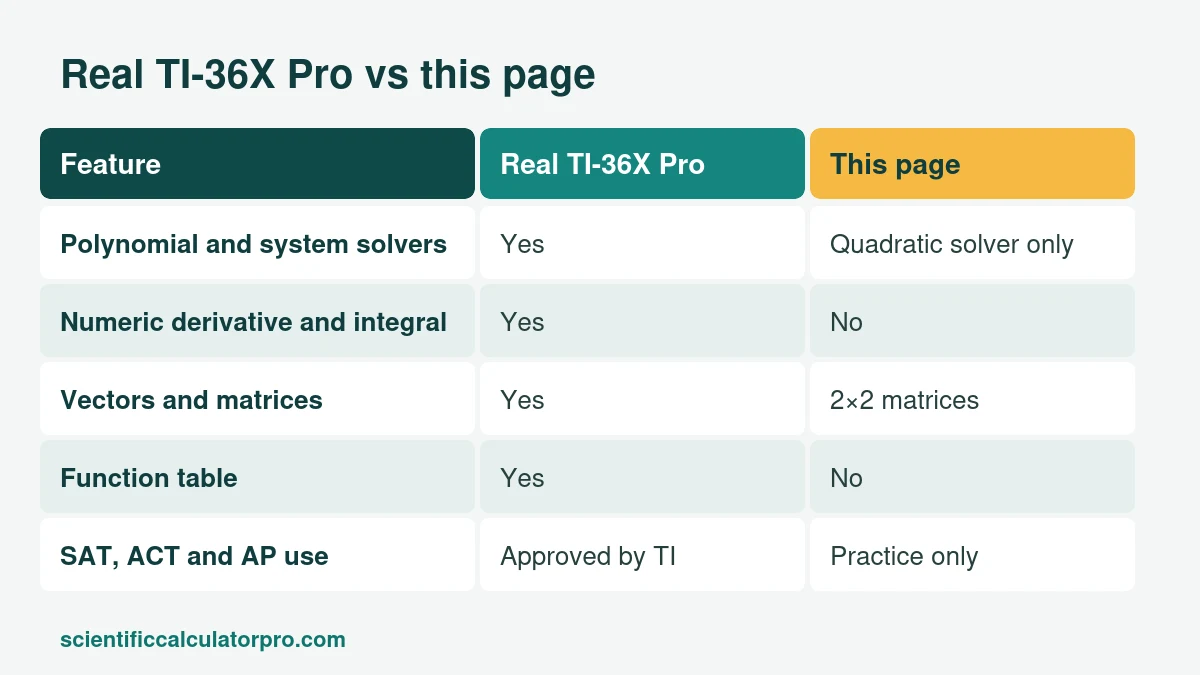
Texas Instruments sells TI-SmartView emulator software for classroom projection for some of its scientific calculators, and it costs money. We found no free public web version of the TI-36X Pro. This page is a free TI-36X Pro online alternative for the core scientific functions. It does not copy the four-line display or the menus, so use it for homework and checking steps, and bring the real calculator to exams.
What Sets the TI-36X Pro Apart From Other Scientific Calculators?
TI describes it as a four-line scientific calculator that goes past the basics. It has numeric equation, polynomial and linear-system solvers, numeric derivatives and integrals, vectors and matrices, a function table, one- and two-variable statistics, nine physical constants, eighteen metric and English conversions, and fraction, decimal and percent conversion. TI lists it as approved for the SAT, ACT and AP exams, and NCEES lists the TI-36X family for engineering licensing exams. That mix is why engineering students keep one for years.
TI-36X Pro Online Key Guide: Where Is Each Key?
| On the TI-36X Pro | What it does | On this page |
|---|---|---|
| 2nd, then ON | Turns the calculator off | Not needed |
| (−) | Negative sign, separate from subtract | Minus and ± keys, with brackets such as (−2)^2 |
| Scientific notation key | Enters powers of ten | EXP key |
| Answer toggle key | Switches between exact and decimal answers | Fraction calculator |
| MODE, then DEG or RAD | Sets the angle unit | Deg and Rad buttons above the display |
| Equation solvers (menu) | Numeric, polynomial and linear-system solvers | Quadratic solver in Extended Functions |
| Matrix and vector menus | Matrix and vector math | 2×2 matrices in Extended Functions |
| Statistics (DATA, STAT) | One and two variable statistics | Statistics in Extended Functions |
| Table | Function table | Not available |
What Does the Extended Functions Panel Cover in This TI-36X Pro Online Alternative?
Statistics returns count, sum, mean, and both population and sample standard deviation. The solver handles ax² + bx + c = 0 with real and complex roots. The base converter works between binary, octal, decimal and hex, and the matrix tool does A + B, A × B and the determinant for 2×2 matrices.
How Do You Solve a Quadratic on the TI-36X Pro and on This Page?
Take x² − 5x + 6 = 0. In the TI-36X Pro polynomial solver you enter the coefficients 1, −5 and 6 and read the roots 2 and 3. On this TI-36X Pro online page, open the solver in Extended Functions, enter a = 1, b = −5, c = 6 and press Solve. You get x1 = 2 and x2 = 3. For x² + 2x + 5 = 0 the panel returns the complex roots −1 ± 2i.
How Can You Check a Numeric Derivative Without a Derivative Key?
This page has no calculus key, but you can approximate a derivative by hand. The slope of f(x) = x² at x = 3 is close to (f(3.001) − f(2.999)) ÷ 0.002. Type (3.001^2 − 2.999^2) ÷ 0.002 and the result is 6, which matches the exact derivative 2x at x = 3. The TI-36X Pro does this with its built-in numeric derivative, and the check is a good way to see what that key is doing.
Is the TI-36X Pro Allowed on the SAT, ACT and AP Exams?
TI lists it as approved for all three. It is also not a CAS calculator, and NCEES lists the TI-36X family for the FE and PE exams. Policies change, so read the official page for your test date. In South Africa, matric exam circulars have asked for approved, non-programmable, non-graphical calculators, so confirm the model with your school. ENEM in Brazil allows no personal calculator.
TI-36X Pro Online or the Real One: Which Should You Use?
Use this page for homework and quick checks, and the real TI-36X Pro for exams. If you are still choosing a model, our buying guide compares it with the Casio fx-991EX and TI-30XS MultiView, and the scientific vs graphing calculator guide explains when a graphing model is the better buy.
Is This Page Affiliated With Texas Instruments?
No. This is an independent calculator. TI-36X Pro is a trademark of Texas Instruments.
Related Calculators
- Free Online Scientific Calculator
- Desmos Scientific Calculator Alternative: Free Online Tool
- Casio fx-991 Online Alternative: Free Scientific Calculator
- Casio fx-115ES Online Alternative: Free Scientific Calculator
- TI-30XS MultiView Online Alternative: Free Scientific Calculator
- Sharp EL-501 Online Alternative: Free Scientific Calculator
- Scientific Notation Calculator
- Fraction Calculator
Sources
Checked October 2026. Worked examples were calculated by hand and verified.