
Need a TI-30XS MultiView online? This free scientific calculator covers the core functions in your browser: trig, logs, powers, roots and memory. A key guide below shows where the keys you know from the TI-30XS MultiView sit on this page, and the sections after it cover fractions and statistics, the two jobs students use that calculator for most.
Is There a Free TI-30XS MultiView Online?
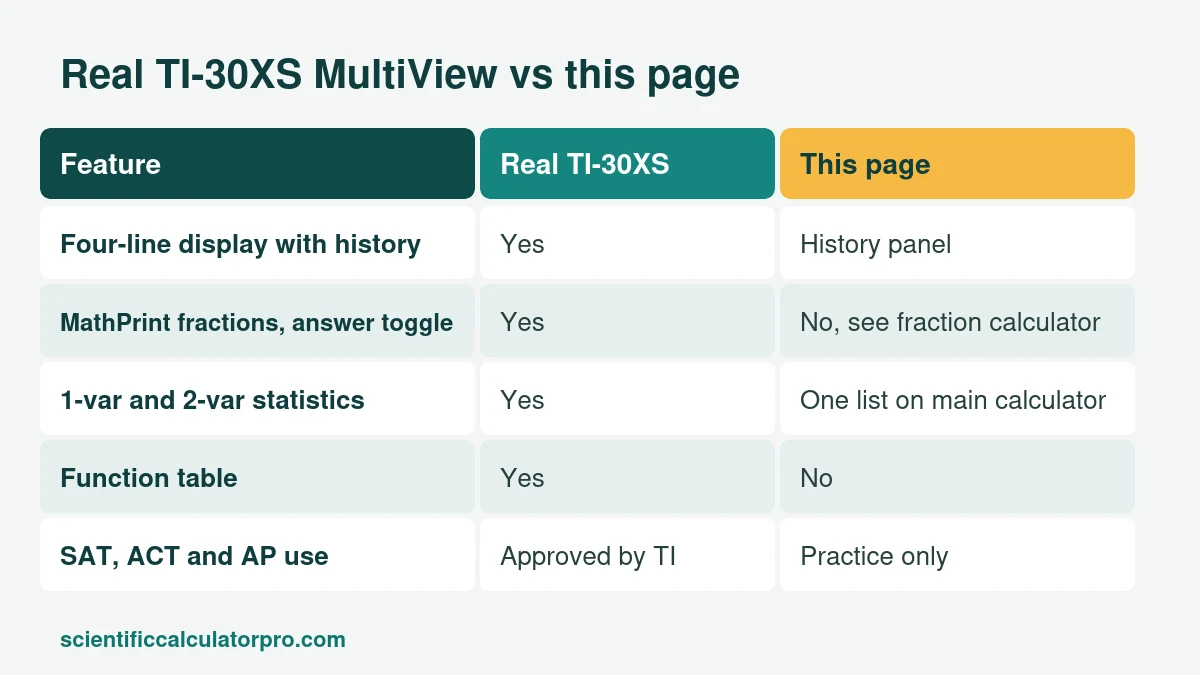
Texas Instruments sells TI-SmartView emulator software that teachers use to project the TI-30XS MultiView in class, and it costs money. We found no free public web version. This page is a free TI-30XS MultiView online alternative that matches the core scientific functions, not the display or the menus. It suits homework and checking steps, and the physical calculator is what you bring to a test.
What Makes the TI-30XS MultiView Different From Other Scientific Calculators?
- A four-line MultiView display (four lines of 16 characters) keeps earlier entries and results on screen.
- MathPrint shows fractions and exponents the way a textbook does.
- An answer toggle key switches between fraction and decimal, exact square root and decimal, and exact pi and decimal.
- One-variable and two-variable statistics, plus a function table.
- No calculus. The TI-36X Pro adds numeric derivatives and integrals.
TI-30XS MultiView Online Key Guide: Where Is Each Key?
| Key on the TI-30XS MultiView | What it does | On this page |
|---|---|---|
| 2nd | Opens the function printed above a key | Not needed |
| 2nd, then ON | Turns the calculator off | Not needed |
| (−) | Negative sign, separate from subtract | The minus and ± keys, with brackets such as (−2)^2 |
| x10ⁿ | Enters scientific notation | EXP key |
| n/d and Un/d | Fraction and mixed number entry | Fraction calculator |
| Answer toggle key | Switches fraction and decimal, exact roots and pi | Fraction calculator |
| MODE, then DEG or RAD | Sets the angle unit | Deg and Rad buttons above the display |
| DATA and 2nd STAT | Statistics lists | Statistics in Extended Functions on the main calculator |
| TABLE | Function table | Not available |
How Do You Enter Fractions on a TI-30XS MultiView?
Press the fraction key (n/d), type the top number, press the down arrow, type the bottom number, then press the right arrow to leave the fraction. Press ENTER for the result, and use the answer toggle key to flip between fraction and decimal. For 3/4 + 5/6 the exact answer is 19/12, and the decimal is 1.5833. On this TI-30XS MultiView online page, type 3 ÷ 4 + 5 ÷ 6 to get 1.583333333, and use the fraction calculator when you need 19/12 itself.
How Do You Find Mean and Standard Deviation on a TI-30XS MultiView?
Use the data set 4, 8, 6, 5, 7. On the calculator, press DATA, type the five values into the list, press 2nd STAT and choose 1-VAR. You will see a mean of 6, a sample standard deviation Sx of 1.581 and a population standard deviation of 1.414. To check the same numbers without a TI-30XS MultiView online, open the Extended Functions panel on our main calculator and enter 4, 8, 6, 5, 7. It returns all three. If you write decimals with a comma, separate the values with semicolons.
Is the TI-30XS MultiView Allowed on the SAT and ACT?
TI lists the TI-30XS MultiView as approved for the SAT, ACT and AP exams, and it is not a CAS calculator. NCEES also lists the TI-30X family for the FE and PE exams. Always read the official policy for your test date. In South Africa, matric exam circulars have asked for approved, non-programmable, non-graphical calculators, so confirm the model with your school. ENEM in Brazil allows no personal calculator.
Is the TI-30XS MultiView Worth Buying?
For US middle and high school it is a safe, widely used pick. If you need calculus keys, a TI-36X Pro or a Casio fx-991EX goes further. Our buying guide compares them, and our guide to using a scientific calculator covers angle mode and error messages, the same whether you use this TI-30XS MultiView online page or the real one.
Is This Page Affiliated With Texas Instruments?
No. This is an independent calculator. TI-30XS MultiView is a trademark of Texas Instruments.
Related Calculators
- Free Online Scientific Calculator
- Desmos Scientific Calculator Alternative: Free Online Tool
- Casio fx-991 Online Alternative: Free Scientific Calculator
- Casio fx-115ES Online Alternative: Free Scientific Calculator
- TI-36X Pro Online Alternative: Free Scientific Calculator
- Sharp EL-501 Online Alternative: Free Scientific Calculator
- Scientific Notation Calculator
- Fraction Calculator
Sources
Checked October 2026. Worked examples were calculated by hand and verified.