
This is a free Casio fx-991 online alternative for when your calculator is at home or in your bag. It covers trig, logs, powers, memory and factorials in the browser, plus statistics, a quadratic solver, a base converter and 2×2 matrices further down. A key-by-key guide shows what each fx-991 button does and where its closest match sits on this page.
Is There an Official Casio fx-991 Online?
Casio's official ClassWiz emulator is a teacher tool sold as a licence through ClassPad.net, and we found no free public web version of the fx-991. This page is a free Casio fx-991 online alternative that matches the core scientific functions. It is not an exact copy of the menus or the display, and it works as a casio scientific calculator online for homework and for checking steps.
Which Casio fx-991 Do You Have?
The name covers several generations, and the keys differ a little between them.
| Model | What stands out | Good to know |
|---|---|---|
| fx-991EX ClassWiz | 192 × 63 high-resolution display, 552 functions, spreadsheet, QR code, solar plus battery | Non-programmable, and the strongest common fx-991 |
| fx-991ES Plus | Natural textbook display | Casio's fx-991ES Plus C manual lists the ÷R quotient and remainder function |
| fx-991CW | Newer ClassWiz CW | Owners report a history list that clears when you switch off |
| fx-991ZA Plus II | The model Casio documents for South Africa | Its manual also lists ÷R |
Casio fx-991 Online Key Guide: Where Is Each Key?
This table matches the fx-991 keys students ask about most to the nearest control on this page.
| Key on the fx-991 | What it does | On this page |
|---|---|---|
| SHIFT, then MODE or MENU (Setup) | Switches degrees and radians | Deg and Rad buttons above the display |
| Ans | Reuses the last answer | Tap an earlier result in the history panel |
| ×10^x | Enters scientific notation | EXP key, covered in the scientific notation calculator |
| x⁻¹ | Reciprocal | 1/x key |
| S⇔D | Switches fraction and decimal | Not on the keypad, use the fraction calculator |
| SHIFT, then sin | Inverse sine | Not on this keypad |
| ÷R (ES Plus models) | Quotient and remainder | Not available, use the three-step method in our MOD guide |
| MODE, then Statistics, Equation, Base-N or Matrix | Special modes | Extended Functions panel below |
What Does the Extended Functions Panel Cover in This Casio fx-991 Online Alternative?
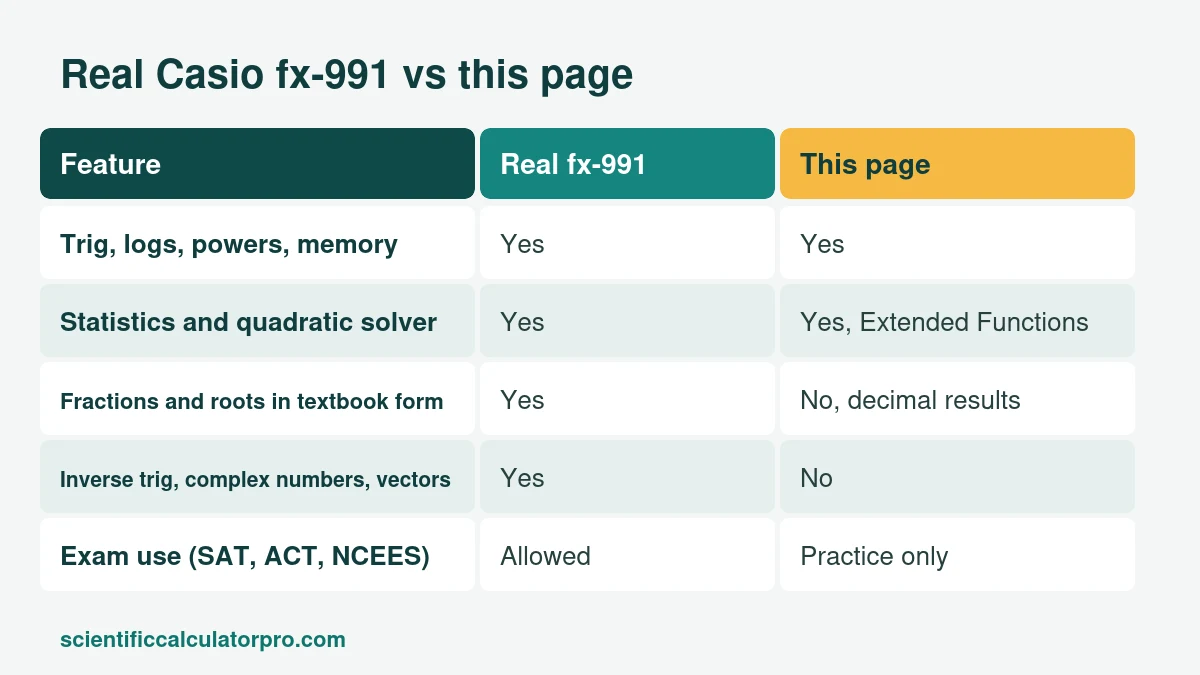
The fx-991 line has statistics, equation solving, base conversion and matrices, so this page includes the same kinds of tools. Statistics gives count, sum, mean, and both population and sample standard deviation. The solver handles ax² + bx + c = 0, including complex roots. The base converter works between binary, octal, decimal and hex, and the matrix tool does A + B, A × B and the determinant for 2×2 matrices. Try the data 4, 8, 6, 5, 7: the mean is 6, the population standard deviation is 1.414 and the sample standard deviation is 1.581.
What Can a Real Casio fx-991 Do That a Casio fx-991 Online Tool Cannot?
A lot, and it is better to know before an exam. On most fx-991 models the physical calculator adds these:
- Textbook display with exact fractions and roots, switched with S⇔D
- Inverse and hyperbolic trig functions
- Complex numbers and vectors
- Matrices larger than 2×2
- Numeric derivatives and integrals
- On the EX: spreadsheet mode and QR codes
Is the Casio fx-991 Allowed on Exams?
The SAT and ACT allow scientific calculators that are not CAS models, and the fx-991 line is not CAS. NCEES also lists the Casio fx-991 line for the FE and PE engineering exams. In South Africa, check that your school accepts the fx-991ZA Plus II or the fx-82ZA Plus II, because matric exam circulars have asked for approved, non-programmable, non-graphical calculators. ENEM in Brazil allows no personal calculator. A Casio fx-991 online tool is for practice only, because phones and web pages are not allowed in exam rooms.
Casio Fx-991 Online or the Real One: Which Should You Use?
Use this page for homework, for checking a step, or when your calculator is not with you. Use the real fx-991 for exams, and practise on the model you will bring. Our buying guide compares the fx-991EX with the TI-36X Pro and other common choices, and the beginner's guide covers angle mode, memory and error messages.
Is This Page Affiliated With Casio?
No. This is an independent calculator. Casio and fx-991 are trademarks of Casio Computer Co., Ltd.
Related Calculators
- Free Online Scientific Calculator
- Desmos Scientific Calculator Alternative: Free Online Tool
- Casio fx-115ES Online Alternative: Free Scientific Calculator
- TI-30XS MultiView Online Alternative: Free Scientific Calculator
- TI-36X Pro Online Alternative: Free Scientific Calculator
- Sharp EL-501 Online Alternative: Free Scientific Calculator
- Scientific Notation Calculator
- Fraction Calculator
Sources
Checked October 2026.